
Gitignore: Keep Files Out of Your Repository
A .gitignore file tells Git which files never to track. This tutorial covers pattern syntax, how to untrack files that were already committed, debugging rules, and using a global ignore for personal files.
Beginner7 min readUpdated
What is a .gitignore file?
A .gitignore file is a plain text file at the root of a repository that lists patterns of files and folders Git should ignore. Ignored files are not shown as untracked and are never staged by git add. It has no effect on files Git already tracks.
The short version
- 1Create
.gitignoreat the repository root - 2Add patterns such as
node_modules/,.env, anddist/ - 3Commit the file:
git add .gitignore && git commit -m "Add .gitignore" - 4Untrack already committed files:
git rm --cached <file> - 5Debug a rule:
git check-ignore -v <file>
Why it matters
Your git status is flooded with node_modules, .DS_Store, and build output. Or worse, you committed a .env file with real credentials and only noticed after pushing.
A .gitignore file tells Git which files to never track. It keeps repositories small, diffs readable, and secrets out of history. Setting it up before the first commit is far easier than cleaning up afterwards.
Where it usually goes wrong
- Adding a file to
.gitignoreafter it is already tracked, and wondering why Git still shows it - Misplacing a slash so a pattern matches too much or too little
- Ignoring a file that was already committed with secrets, assuming that removes it from history
- Committing OS and editor files (
.DS_Store,.idea/) that belong in a global ignore
Gitignore, step by step
Step 1: Create the .gitignore file
Create a file named
.gitignoreat the root of the repository and commit it so the whole team shares the same rules.Terminaltouch .gitignoregit add .gitignoregit commit -m "Add .gitignore"Tip: GitHub's
github/gitignorerepository has ready-made templates for almost every language and framework.Step 2: Write patterns
One pattern per line. A trailing
/matches folders only,*is a wildcard,#starts a comment, and a leading!re-includes something..gitignore# Dependenciesnode_modules/# Build outputdist/*.log# Secrets.env.env.*!.env.example# OS files.DS_StoreStep 3: Understand where patterns apply
A leading
/anchors a pattern to the folder containing the.gitignore. Without it, the pattern matches at any depth.**matches across folders..gitignore# Only the build folder at the root/build# Any folder named cache, anywherecache/# Any .tmp file under any docs folderdocs/**/*.tmpStep 4: Stop tracking a file that is already committed
Adding a pattern does nothing to files Git already tracks. Remove them from the index (not from disk) with
--cached, then commit.Terminalgit rm --cached .envgit rm -r --cached node_modulesgit commit -m "Stop tracking ignored files"Careful: The file stays in your history. If it contained a secret, rotate the secret: ignoring it is not enough.
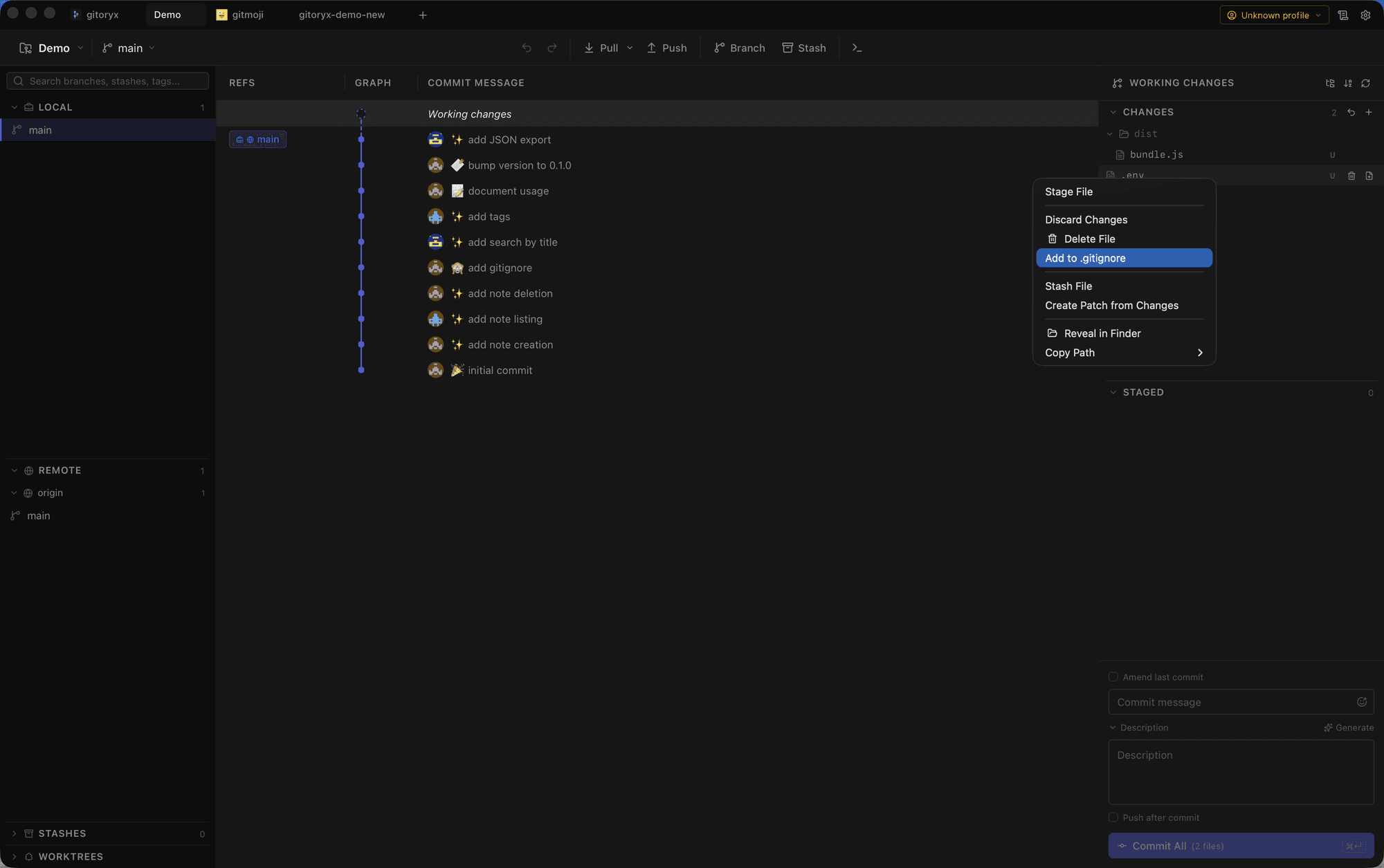
In Gitoryx: Right-click an untracked file to add it, its folder, or its extension to .gitignoreHow it worksStep 5: Find out why a file is ignored
When a file will not show up,
git check-ignore -vprints the exact rule and file responsible.Terminalgit check-ignore -v path/to/file# .gitignore:3:dist/ dist/bundle.jsStep 6: Use a global ignore for personal files
Editor and OS files belong to you, not to the project. Put them in a global ignore file so you never have to add them to every repository.
Terminalgit config --global core.excludesfile ~/.gitignore_globalecho ".DS_Store" >> ~/.gitignore_globalecho ".idea/" >> ~/.gitignore_global
Mistakes to avoid with gitignore
- Expecting .gitignore to untrack files
.gitignoreonly affects untracked files. A file already committed stays tracked, and changes to it keep showing up.- Fix: Run
git rm --cached <file>and commit. The file stays on disk but leaves the index. - Believing ignoring a secret makes it safe
- If a secret was ever committed, it remains in history and in every clone, even after you ignore and untrack the file.
- Fix: Rotate the credential immediately, then rewrite history if needed.
- Ignoring a folder, then trying to re-include a file inside it
- Git cannot re-include a file if its parent folder is ignored:
!dist/keep.txthas no effect afterdist/. - Fix: Ignore the contents instead:
dist/*then!dist/keep.txt.
Gitignore in Gitoryx
In Gitoryx, ignored files disappear from the changes list, and you can add any untracked file to .gitignore straight from its context menu.
- Right-click an untracked file to add it, its folder, or its extension to
.gitignore - Ignored files stay out of the changes list, so you only review what matters
- Spot an accidentally tracked file in the diff and untrack it in one action
- Edit
.gitignoreand see the effect on the file list straight away
Free plan · no account required · macOS, Windows and Linux
Gitignore: frequently asked questions
- Where should the .gitignore file go?
- At the root of the repository for project-wide rules. You can also add
.gitignorefiles in subfolders; their patterns apply to that folder and below. - Why is Git still tracking a file I added to .gitignore?
- Because it was committed before. Run
git rm --cached <file>and commit; after that the ignore rule takes effect. - How do I ignore a file only on my machine?
- Add it to
.git/info/exclude, which works like.gitignorebut is never committed or shared. - How do I see all ignored files?
- Run
git status --ignoredorgit ls-files --others --ignored --exclude-standard. - Can I commit an ignored file anyway?
- Yes, with
git add -f <file>. Use it rarely, as it usually signals a rule that needs adjusting.
Related reading
- Git Status: How to Check the State of Your RepositoryTutorial · 7 min
- Git Add: How to Stage Changes Before a CommitTutorial · 7 min
- Git Init: Start a New Repository From ScratchTutorial · 6 min