
Git Clone: How to Copy a Repository
git clone is how you download a repository to your local machine. This tutorial explains the different cloning methods, options like depth and branch selection, and how to handle common issues.
Beginner8 min readUpdated
What is git clone?
git clone creates a local copy of a remote repository, including its full history, branches, and tags. It automatically creates a remote called origin pointing back to the source.
The short version
- 1Copy the repository URL (HTTPS or SSH)
- 2Run
git clone <url>in your terminal - 3Enter the newly created folder:
cd <repo-name> - 4Verify the remote:
git remote -v - 5For large repos, use
--depth 1for a shallow clone
Why it matters
You want to work on a project hosted on GitHub or GitLab. You could download the ZIP, but then you'd lose all Git history and collaboration features. The right tool is git clone.
Cloning is how every developer gets a local copy of a remote repository. It downloads the full history, sets up the remote origin automatically, and puts you ready to commit, push, and collaborate immediately.
Where it usually goes wrong
- Using HTTPS instead of SSH and being prompted for a password on every push
- Cloning into the wrong directory or an already-existing folder
- Forgetting to clone before trying to
git pull(you can't pull what doesn't exist locally) - Cloning a repo with a very large history and waiting minutes for it to complete
Git clone, step by step
Step 1: Copy the repository URL
On GitHub, GitLab, or Bitbucket, click the 'Code' or 'Clone' button and copy the URL. You'll see two options: HTTPS and SSH.
Tip: Use SSH if you've set up SSH keys: you'll never be prompted for a password. Use HTTPS for a quick start without SSH setup.
Step 2: Clone the repository
Run
git clone <url>in the terminal. Git creates a new folder with the repository name and downloads everything inside.Terminal# Clone via HTTPSgit clone https://github.com/user/my-project.git# Clone via SSHgit clone git@github.com:user/my-project.gitStep 3: Clone into a custom folder name
By default, Git names the folder after the repo. Pass a second argument to use a different name.
Terminalgit clone git@github.com:user/my-project.git frontendStep 4: Clone a specific branch
By default, you get the default branch (usually
mainormaster). Use-bto start on a specific branch.Terminalgit clone -b develop git@github.com:user/my-project.gitStep 5: Clone a specific tag
To clone the exact state of a tagged release, useful for reproducing a specific version or auditing old code:
Terminalgit clone --branch v2.3.0 git@github.com:user/my-project.gitTip: The
--branchflag accepts both branch names and tag names. The resulting clone checks out that tag directly.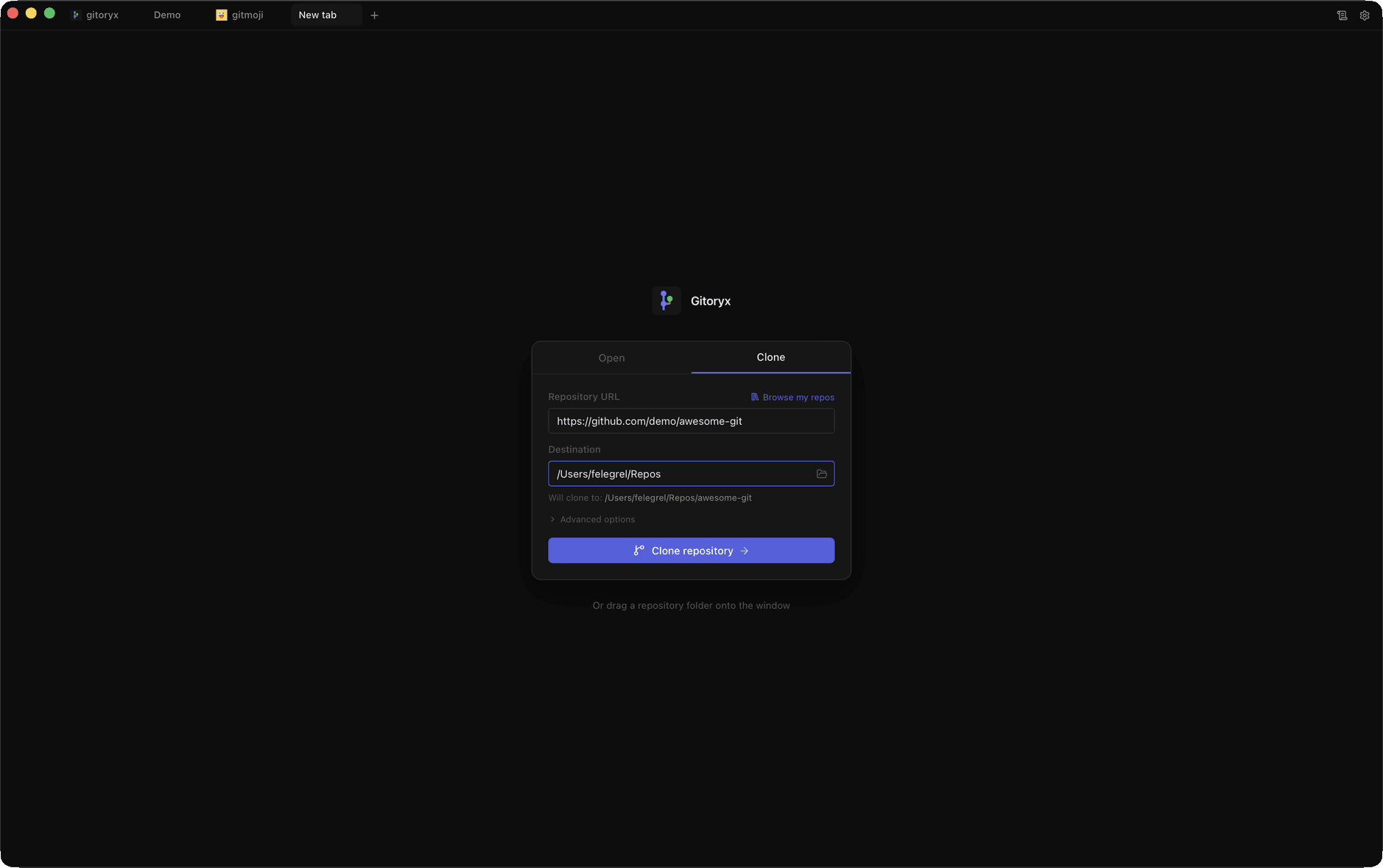
In Gitoryx: Paste any HTTPS or SSH URL and clone with one clickHow it works Step 6: Shallow clone for large repositories
If the repository has a very long history and you just need the latest code,
--depth 1clones only the most recent commit. You can also do a partial clone with--filterto skip large binary blobs entirely.Terminal# Shallow clone - only the latest commitgit clone --depth 1 git@github.com:user/large-repo.git# Partial clone - skip large binary objects (Git 2.22+)git clone --filter=blob:none git@github.com:user/large-repo.git# Shallow + specific branchgit clone --depth 1 --branch develop git@github.com:user/large-repo.gitCareful: Shallow clones lack full history. Commands like
git log,git bisect, andgit blamewill be limited. Don't use--depth 1if you plan to contribute back.Step 7: Bare and mirror clones
A bare clone contains only the Git objects with no working directory, used for server hosting or backups. A mirror clone is a bare clone that also copies all refs (branches, tags, notes) and is kept in sync.
Terminal# Bare clone (for hosting / server use)git clone --bare git@github.com:user/my-project.git my-project.git# Mirror clone (full backup including all refs)git clone --mirror git@github.com:user/my-project.git my-project.git# Update a mirror clone later:cd my-project.gitgit remote updateTip: Use
--barewhen setting up a central Git server. Use--mirrorfor full automated backups: it replicates every ref exactly.Step 8: Clone URL protocols: HTTPS vs SSH
Git supports three URL formats for cloning. Each has different authentication requirements and use cases.
Terminal# HTTPS - easy to start, prompts for credentials or uses credential managergit clone https://github.com/user/my-project.git# SSH - requires SSH key setup, no password prompts after thatgit clone git@github.com:user/my-project.git# Git protocol - fast, read-only, used for public open-source reposgit clone git://github.com/user/my-project.git# Switch an existing clone from HTTPS to SSH:git remote set-url origin git@github.com:user/my-project.gitTip: For daily development, SSH is the best choice: set up your key once and never enter a password again. HTTPS is fine for a quick one-off clone.
Step 9: Verify the clone
After cloning, enter the folder and check the remote is set correctly.
Terminalcd my-projectgit remote -v# origin git@github.com:user/my-project.git (fetch)# origin git@github.com:user/my-project.git (push)
Mistakes to avoid with git clone
- Cloning into a non-empty folder
- Git refuses to clone into a folder that already contains files.
- Fix: Create a new empty folder first, or let Git create it automatically by not passing a destination path.
- Using HTTPS and entering credentials on every push
- Without a credential helper or SSH keys, Git asks for your username and password each time.
- Fix: Set up SSH keys and use the SSH clone URL, or configure Git Credential Manager.
- Cloning instead of forking a project you want to contribute to
- If you don't have write access to the repo, you need to fork it first, then clone your fork.
- Fix: Fork the project on GitHub/GitLab, then clone your own fork.
Git clone in Gitoryx
Gitoryx lets you clone any repository by pasting a URL: it handles HTTPS and SSH automatically and opens the repo in the visual interface as soon as the clone completes.
- Paste any HTTPS or SSH URL and clone with one click
- Gitoryx detects and configures SSH keys automatically
- The repository opens in the visual graph immediately after cloning
- Switch branches and inspect history right after clone, no CLI needed
Free plan · no account required · macOS, Windows and Linux
Git clone: frequently asked questions
- What is the difference between `git clone` and `git pull`?
git clonecreates a brand new local copy of a remote repository from scratch.git pullupdates an existing local repository with new changes from the remote. You clone once; you pull many times.- What is the difference between git clone and git fork?
- Forking creates a copy of a repository under your own account on a hosting platform (GitHub, GitLab). Cloning downloads a repository to your local machine. You typically fork first on GitHub, then clone your fork locally.
- Can I clone a private repository?
- Yes, as long as you have access. Use SSH keys or HTTPS with your credentials. On GitHub you can also use a personal access token in place of a password.
- Does `git clone` download all branches?
- Yes, all remote branches are fetched, but only the default branch is checked out locally. Use
git checkout -b <branch> origin/<branch>to switch to another branch after cloning. - How do I clone only one branch?
- Use
git clone -b <branch-name> <url>. This checks out the specified branch, though the other remote branches are still available. - Why is git clone slow on a large repository?
- Large repos can be slow because Git downloads the full history of every file. Use
--depth 1for a shallow clone of only the latest commit, or--filter=blob:nonefor a partial clone that skips large binary objects. - What is a bare clone in Git?
- A bare clone (
git clone --bare) creates a copy that contains only Git's internal objects with no working directory. Bare repositories are used for hosting and server-side backups, which is what services like GitHub store on their servers. - What is the difference between SSH and HTTPS clone URLs?
- HTTPS clone URLs (
https://github.com/...) use password or token authentication and work anywhere. SSH clone URLs (git@github.com:...) use key-based authentication, faster for daily use once you set up your SSH key, and no password prompts. - How do I clone into a different folder name?
- Pass the desired folder name as a second argument:
git clone <url> my-folder-name. Git will create a folder with that name instead of the repo's default name.
Related reading
- Git Remote: Connect Your Repo to a Remote ServerTutorial · 8 min
- Git Pull: Sync Your Branch with the RemoteTutorial · 8 min
- Git Commit: The Complete Beginner's GuideTutorial · 9 min