A support ticket says checkout fails for customers with a saved payment method. You try it locally and reproduce it in thirty seconds. Then you check out the tag from three weeks ago and it works fine.
So the bug is in the 214 commits between those two points. That is the entire useful information you have, and testing 214 commits by hand is not a plan.
git bisect is the plan. It is a binary search over
the commit range, and it will get you from 214 candidates to one in eight tests.
#The math, briefly
Each test cuts the remaining range in half. 214 becomes 107, then 54, then 27, then 14, then 7, then 4, then 2, then 1. Eight steps.
The useful property is how slowly that grows. A thousand commits is ten steps. Ten thousand is fourteen. The range being enormous is not really an argument against bisecting, which is the opposite of most people's intuition and the reason bisect is underused.
What does cost you is the time it takes to test a single commit. If reproducing the bug takes five seconds you will be done in a minute. If it requires a full build, a database migration and a manual click-through, eight steps is an afternoon. That is the number to optimise, and it is why the automated mode further down matters so much.
#The basic loop
You need two things before you start: a commit where the bug exists, and a commit where
it does not. Usually the first is HEAD and the second is a release tag you know was
fine.
git bisect start
git bisect bad                 # current HEAD is broken
git bisect good v1.4.0         # this tag was fine
Git responds with something like:
Bisecting: 106 revisions left to test after this (roughly 7 steps)
[8f3a91c2b4] add retry logic to the payment webhook
It has checked out a commit halfway through the range. Test it. Then answer:
git bisect good    # bug is not present here
# or
git bisect bad     # bug is present here
Git checks out the next commit and tells you how many steps remain. Repeat until it prints the verdict:
8f3a91c2b4a7d3e9f1c0b2a4d6e8f0a2c4b6d8e0 is the first bad commit
commit 8f3a91c2b4a7d3e9f1c0b2a4d6e8f0a2c4b6d8e0
Author: Dana Whitfield <dana@example.com>
Date:   Tue Aug 18 14:22:10 2026 +0200

    ♻️ normalise stored card tokens before lookup
Then clean up. This is the step people forget:
git bisect reset
That returns you to the branch you were on before you started. Without it you are left sitting on a detached HEAD in the middle of your own history, which is confusing an hour later when you have moved on to something else.
#Picking the starting points
The two commits you supply determine everything, and getting them wrong is the most common reason a bisect ends somewhere that makes no sense.
The bad end is usually easy: HEAD, or the tag that is live in production. The good
end is where people guess, and guessing costs you the whole session.
# Releases, newest first, so you can pick a plausible good tag.
git tag --sort=-creatordate | head

# How many commits are actually in the range.
git rev-list --count v1.4.0..HEAD
Verify the good commit before starting. Check it out, reproduce, confirm the bug is
absent. Two minutes there saves eight test cycles converging on the wrong answer.
git rev-list takes any of the range syntax
git log understands, so the same A..B notation works for counting commits as for
walking them.
If you have no idea how far back to go, do not binary search for the starting point by
hand. Pick something you are confident about even if it is far too old. An extra 400
commits in the range costs you two additional steps, which is nothing compared to
restarting because your good was not good.
The one-line version, when you are confident about both ends:
git bisect start HEAD v1.4.0 # bad first, then good
#Automating it
The moment your test can be expressed as a command that exits 0 or non-zero, you can stop answering questions.
git bisect start
git bisect bad
git bisect good v1.4.0
git bisect run npm test -- checkout.spec.ts
Git runs the command at each step and reads the exit code. Zero means good, anything from
1 to 127 means bad, with one exception described below. It works through the entire range
unattended and prints the first bad commit. The exact rules are in the
bisect run section of the manual, and
they matter once your script does anything more than call a test runner.
For anything that is not already a test, write a three-line script. This one is a complete bisect driver:
#!/usr/bin/env bash
# bisect-check.sh
npm ci --silent || exit 125        # cannot build: skip this commit
npm run build --silent || exit 125
node ./scripts/repro-checkout.js   # exits 0 if fine, 1 if the bug reproduces
chmod +x bisect-check.sh
git bisect run ./bisect-check.sh
Exit code 125 is the special one: it tells Git the commit cannot be tested and should be skipped rather than counted. Using it for build failures is what keeps an automated bisect from derailing on a commit that never compiled in the first place.
You can also inline a test without a script file:
git bisect run sh -c 'grep -q "requestTimeout" src/config.ts'
That finds the commit where a string appeared or disappeared, which is a surprisingly common need when tracking down a config regression.
#Skip, and when to use it
Sometimes a commit genuinely cannot be judged. It does not build, the feature under test did not exist yet, or the test infrastructure was mid-migration.
git bisect skip
Git picks a different commit nearby and carries on. If a whole stretch is untestable, you can skip a range:
git bisect skip v1.4.2..v1.4.5
The one thing not to do is mark an untestable commit as good because you want to keep
moving. That is not a neutral choice. It tells Git the bug is definitely in the other
half, and if you were wrong, the search converges confidently on the wrong commit and you
will not find out until you read the diff and it makes no sense.
#The commands nobody mentions
Four more, each of which solves a specific annoyance.
git bisect log and git bisect replay. The log records every answer you have given.
If you realise halfway through that you marked something wrong, you do not have to start
over:
git bisect log > /tmp/bisect.log
# edit the file, delete the wrong line
git bisect reset
git bisect replay /tmp/bisect.log
This also makes a session shareable. Hand the log to a colleague and they resume exactly where you were.
git bisect visualize. Opens the remaining candidates in your configured history
viewer. Useful at the point where the range is down to a handful and you would rather read
them than keep testing.
git bisect start --no-checkout.
Bisects without touching your working tree, moving a ref called BISECT_HEAD instead. This
matters when checking out is expensive, such as a repository with large binaries or a build
system that invalidates its cache on every file change.
git bisect start -- <path>. Restricts the search to commits that touched a given
path. If you already know the bug is in the billing code, this can cut a 200-commit range
to 30 before the binary search even starts.
git bisect start -- src/billing/
The path filter and bisect run combine well in a monorepo, where testing every commit
means building packages you do not care about. Say a monorepo has packages/shared-auth,
packages/checkout, and packages/admin, and a token-refresh bug appeared in checkout
sometime after the last shared-auth release. You suspect the regression is in the shared
package, not in checkout's own code, so you restrict the range up front and let bisect run
against the smallest thing that reproduces it:
git bisect start -- packages/shared-auth
git bisect bad HEAD
git bisect good shared-auth-v3.2.0
git bisect run bash -c '
  npm ci --workspace=packages/shared-auth --silent || exit 125
  npm run build --workspace=packages/shared-auth --silent || exit 125
  npm test --workspace=packages/checkout -- token-refresh.spec.ts
'
Every step only installs and builds the one package the bug is suspected to live in, then runs the failing test from the package that actually surfaced it. On a large monorepo that turns a bisect from "rebuild everything eight times" into a few seconds of work per commit, which is the difference between running it automatically and skipping it because it would take all afternoon.
#Bisecting things that are not yes or no
The algorithm needs a boolean, but plenty of regressions are not boolean. A page that got slower, a bundle that grew, memory that creeps. The trick is to pick a threshold and turn the measurement into an exit code.
#!/usr/bin/env bash
# bisect-bundle-size.sh
npm ci --silent   || exit 125
npm run build -s  || exit 125

size=$(wc -c < dist/main.js)
threshold=512000

if [ "$size" -gt "$threshold" ]; then
  echo "bundle is $size bytes, over threshold"
  exit 1     # bad
fi
exit 0       # good
Pick the threshold between the known-good value and the known-bad value, not at some round number that feels tidy. If good is 400 KB and bad is 900 KB, use 600 KB. Using 500 KB risks a commit that legitimately took it from 400 to 510 being marked bad when it is not the change you are hunting.
The same approach works for timings, with one caveat: measure something with low variance and run it enough times to be confident. A flaky measurement makes bisect converge confidently on the wrong commit, which is worse than not bisecting at all.
#The traps
Your good and bad are reversed. git bisect start assumes bad is newer than good. If
you are looking for when something was fixed rather than broken, either invert your
answers mentally or use custom terms:
git bisect start --term-old=broken --term-new=fixed
git bisect fixed
git bisect broken v1.4.0
The full list of alternate-term rules
is worth a skim once you have more than one bisect vocabulary in the same repository, since
good/bad and a custom pair cannot be mixed in the same session.
You picked a good commit that was not actually good. The most common cause of a
bisect ending on a nonsense commit. Verify your starting good before you begin, not
after eight steps.
The bug is intermittent. Bisect assumes a deterministic answer. A flaky race condition will send it somewhere arbitrary. Run the reproduction several times per step, or fix the flakiness first.
You land on a merge commit. Perfectly valid, but the diff will be the whole merged branch. Take the branch's own range and bisect that instead.
The offending commit is huge. Bisect tells you which commit, not which line. A 2,000-line refactor as the answer is progress but not the destination. This is where small, focused commits pay for themselves, which is one of the practical arguments for cleaning up a branch with interactive rebase before merging it.
#Driving it visually
Bisect is one of the operations where the terminal gives you the least context. At each step you get a hash and a subject line. You do not see where that commit sits, which branch it came from, or how much of the range is left in any form you can reason about.
That information is exactly what a commit graph shows.
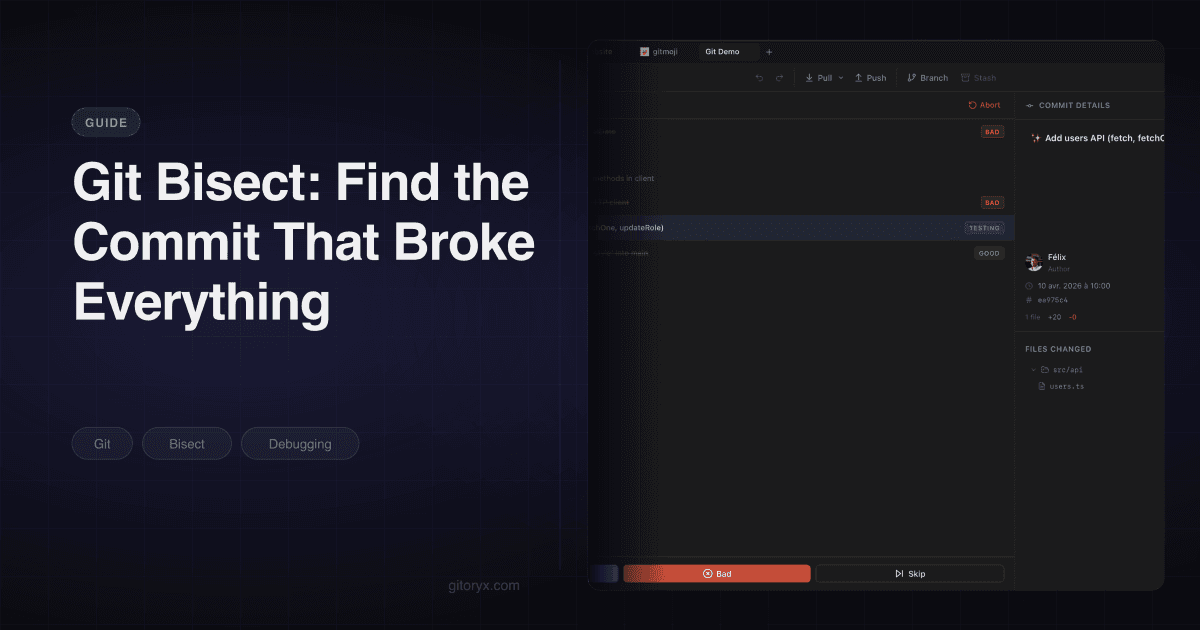
Gitoryx has a dedicated bisect view. You start a session from the graph itself: right-click the commit you know is broken and mark it bad, right-click one you know was fine and mark it good. Both endpoints come from the history in front of you rather than from hashes you copied out of a terminal, which is where most botched bisects begin.
From there the view lists the commits in the range, shows which one is currently checked out, and gives you good, bad and skip as buttons. Each verdict stays visible against the commit it applied to, so you can see what you have already judged instead of scrolling back through your shell to remember whether you called that one good.
That is a smaller claim than "the GUI does the search for you", and it is the honest one. Bisect is the same algorithm either way. What changes is that picking the endpoints and keeping track of your answers stop being manual. We made the broader version of that argument in when a Git GUI beats the terminal.
#After you have the commit
Finding the commit is not the same as understanding the bug.
git show 8f3a91c2b4
Read the diff. If it is small and the cause is obvious, you are done. If the commit is
large, git blame on the specific file narrows it further, and checking whether related
files were touched in the same commit often explains why the change had an effect nobody
expected.
Then decide what to ship. Reverting is usually the fastest safe move on a shared branch, because it creates a new commit rather than rewriting anything. The git revert tutorial covers the mechanics, including what to do when the commit you want to revert is a merge.
Bisect has a reputation as an advanced command, and it is not. It is three commands and a loop. The only reason it stays unused is that people reach for it after an hour of guessing rather than in the first five minutes, which is exactly backwards. If you know a good commit and a bad commit, you already have everything the algorithm needs.