
Compare
Gitoryx vs Lazygit
Lazygit is a popular terminal UI for Git, written in Go. It brings keyboard-driven efficiency to the command line and has earned a loyal following among developers who live in the terminal. But it remains a TUI — there is no mouse support, no visual commit graph in the traditional sense, no drag-and-drop, and no in-app pull request management. Gitoryx gives you the same power as a native, visual application you can pick up in minutes.
Choose Gitoryx if
you want a native, visual application with a persistent commit graph, mouse support, a built-in merge editor and in-app pull requests.
Stick with Lazygit if
you live in the terminal and love a fast, free, keyboard-driven TUI for everyday Git.
Free plan · no account required · macOS 12+ & Windows 10+ · ~12 MB
Feature comparison
| Feature | Gitoryx | Lazygit |
|---|---|---|
| Native GUI (no terminal required) | ||
| macOS / Windows | ||
| Mouse / trackpad support | ||
| Visual commit graph | ||
| Drag-and-drop actions | ||
| Interactive rebase | ||
| Merge conflict editor | ||
| In-app PR management (all hosts) | ||
| 1-click undo/redo (all actions) | ||
| Git worktrees | ||
| No CLI knowledge required | ||
| Free |
Interface
Gitoryx: Native visual appLazygit: Terminal UI onlyLazygit runs exclusively in the terminal. There is no standalone application window, no mouse support, and no visual graph in the traditional sense. The commit graph is a text-based representation shown only when the panel is enlarged. Gitoryx is a native desktop application with a persistent visual commit graph, mouse and trackpad support, and drag-and-drop actions — no terminal required.
Merge conflict resolution
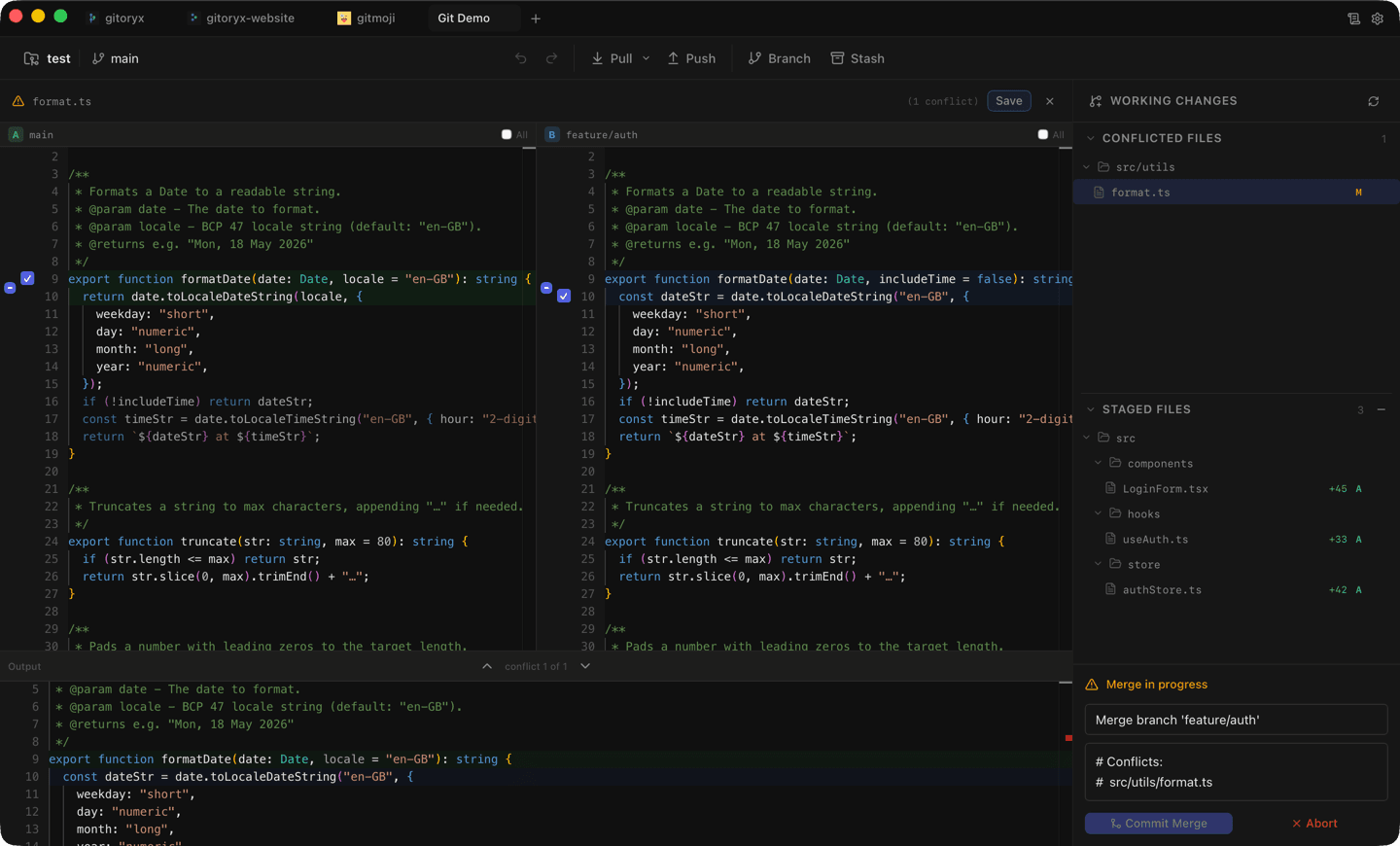
Gitoryx: Built-in visual editorLazygit: External editor requiredWhen a merge conflict occurs in Lazygit, you are sent to your configured external editor or diff tool to resolve it. Gitoryx includes a built-in merge conflict editor with a side-by-side view and output preview — you resolve conflicts without leaving the application.
Pull request management
Gitoryx: GitHub, GitLab, Bitbucket, Azure DevOpsLazygit: Browser onlyLazygit can show GitHub pull request status next to branch names and open them in a browser via the `gh` CLI, but there is no in-app PR creation or management for any host. Gitoryx supports full in-app pull request creation and management across GitHub, GitLab, Bitbucket, and Azure DevOps.
Undo/Redo
Gitoryx: Full undo for all actionsLazygit: Reflog-based, limited scopeLazygit's undo relies on the Git reflog, which means it can undo branch-level operations like commits and resets, but it cannot undo changes to the working tree or stash. Gitoryx supports undo and redo for all major actions — checkout, commit, discard, branch deletion, remote removal, and branch reset — with a single click.
Frequently asked questions
Is Gitoryx a good Lazygit alternative?
Yes — if you prefer a visual GUI. Lazygit is a great terminal UI, but Gitoryx adds a persistent visual commit graph, mouse and trackpad support, a built-in merge conflict editor and in-app pull request management.
Does Gitoryx manage pull requests like Lazygit can't?
Yes. Lazygit can show PR status and open PRs in a browser via the gh CLI, but it can't create or manage them in-app. Gitoryx handles full PR creation and management for GitHub, GitLab, Bitbucket and Azure DevOps.
Do I need to know the terminal to use Gitoryx?
No. Lazygit runs exclusively in the terminal. Gitoryx is a native desktop app — no CLI knowledge required.
Ready to try Gitoryx?
Try it for free, no account required.