
Back
GitoryxGitoryx

Gitoryxvs
GitButler

GitButler is a genuinely innovative newcomer that reimagines how developers interact with Git through its virtual branches concept, allowing you to work on multiple branches simultaneously without switching. It represents a bold departure from traditional Git workflows. Gitoryx takes a different approach, providing a comprehensive and polished interface over standard Git while adding modern conveniences. The two tools serve different philosophies: GitButler reinvents the workflow, Gitoryx perfects the traditional one.

Choose Gitoryx if

you want a comprehensive, stable Git client covering the full spectrum of Git operations — from commits to bisect to PR management — with AI productivity and multi-platform integration.

Stick with GitButler if

you're excited by the virtual branches paradigm and want to experiment with a fundamentally different approach to managing parallel work.

Free plan · no account required · macOS 12+ & Windows 10+ · ~12 MB

Only in Gitoryx

Full visual commit graphInteractive rebase, bisect, reflog, worktreesBuilt-in 3-way merge conflict editorIn-app PR management (all hosts)Stash, GitFlow, patch & changelog generation
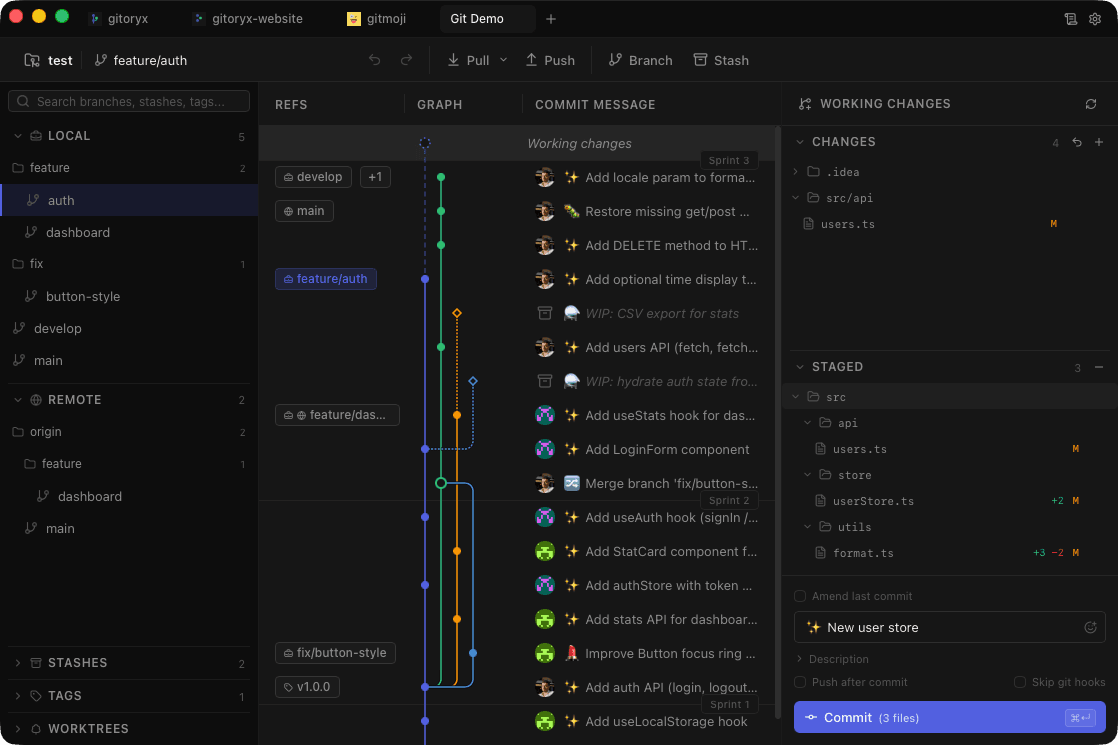
Gitoryx screenshot showing the traditional visual commit graph

Traditional visual commit graph for standard Git workflows

Feature comparison

FeatureGitoryxGitButler
Core Git
Visual commit graphFull resizable graphNon-traditional view
Interactive rebaseDrag-and-drop
Cherry-pick & revert
Line-level & hunk-level stagingAI-assisted grouping
Stash management
Git blame & file history
Merge conflict editorBuilt-in 3-wayBasic
Commit signing (GPG + SSH)Auto-detect keys
Advanced Git
Git bisect UI
Reflog viewer
Git worktrees management
Patch generation
Changelog generation
GitFlow support
1-click undo/redoFull stack
AI & Productivity
AI commit messages
AI-powered change groupingVirtual branches auto-group
Gitmoji picker
Sprint boundary visualization
Command palette
Activity log (audit trail)
Integrations & Platform
macOS & Windows
Linux
Virtual branches (parallel work)Core feature
In-app PR managementGitHub, GitLab, Bitbucket, Azure DevOpsGitHub only (limited)
Integrated terminal
Image diff viewer

Traditional Git vs virtual branches

Gitoryx: Full-featured interface over standard Git workflowsGitButler: Revolutionary virtual branches for simultaneous parallel work

GitButler's virtual branches let you work on multiple branches simultaneously, automatically grouping changes and letting you drag hunks between virtual branches without switching context. This is a fundamentally different mental model. Gitoryx works with Git as it is, providing a polished interface over standard operations. Developers comfortable with Git's branching model will feel immediately at home in Gitoryx, while GitButler requires learning a new paradigm.

Git operations coverage

Gitoryx: Interactive rebase, bisect, reflog, worktrees, stash, blame, historyGitButler: Focused on the virtual branch workflow

Because GitButler reimagines Git around virtual branches, many traditional operations are either unavailable or work differently. Interactive rebase, stash, reflog, bisect, worktrees, blame, and file history are not part of GitButler's current feature set. Gitoryx provides dedicated UI for all of these, making it a complete replacement for the Git CLI.

AI integration

Gitoryx: AI commit messages with multiple providersGitButler: AI-powered commit grouping

Both tools leverage AI, but differently. GitButler uses AI to intelligently group uncommitted changes into logical virtual branches — a compelling use of ML in the workflow. Gitoryx focuses on commit message generation supporting Claude, OpenAI, GitHub Models, and custom endpoints. The approaches are complementary rather than competitive.

Maturity & stability

Gitoryx: Stable feature set, comprehensive Git coverageGitButler: Innovative but still actively evolving

GitButler is a newer project still in active development, with its feature set continuing to mature. This is expected for a tool introducing a genuinely new paradigm. Gitoryx offers a more complete and stable feature set today, covering the full range of Git operations professional developers rely on. For production work where predictability matters, Gitoryx provides a more established foundation.

Hosting platform integration

Gitoryx: In-app PR for GitHub, GitLab, Bitbucket, Azure DevOpsGitButler: Limited GitHub integration

Gitoryx provides in-app PR management across four major hosting platforms. GitButler currently offers limited integration with GitHub but does not support other platforms. For teams using GitLab, Bitbucket, or Azure DevOps, Gitoryx is the only option between the two that provides integrated PR workflows.

Frequently asked questions

What are GitButler's virtual branches?

Virtual branches let you work on multiple branches simultaneously without switching. Your uncommitted changes can be assigned to different virtual branches, and GitButler uses AI to automatically group related changes. It's a fundamentally different approach that eliminates context switching.

Can GitButler replace a traditional Git client?

Not entirely. GitButler doesn't provide traditional operations like interactive rebase, stash, bisect, reflog, or blame. You'd likely need a traditional client or the CLI alongside GitButler for those.

Which tool has better AI features?

Both use AI differently. GitButler auto-groups changes into virtual branches. Gitoryx generates commit messages with multiple AI providers. The approaches serve different purposes.

Should I choose Gitoryx or GitButler?

Choose Gitoryx for a comprehensive Git client with traditional operations, AI commits, and multi-host PR management. Choose GitButler to experiment with a fundamentally different approach to parallel work. They can even be used alongside each other.

Ready to try Gitoryx?

Try it for free, no account required.

Gitoryx

Stop fighting Git. Start shipping.

Download the fast, native Git client that developers actually enjoy using.

v0.0.45 · macOS 12+ · Windows 10+ · Apple Silicon & Intel · ~12 MB