
Git Commit Conventions: Conventional Commits & Gitmoji
A consistent commit message format makes your Git history readable, enables automatic changelogs, and improves collaboration. This guide covers the Conventional Commits specification (feat, fix, chore, docs, refactor…), Gitmoji, and how to enforce standards in your team with hooks and tooling.
Intermediate11 min readUpdated
What do feat, fix and chore mean in a Git commit?
In a Git commit, feat marks a new feature, fix marks a bug fix, and chore marks maintenance work - dependency bumps, build config, tooling - that never changes production behavior. These three are the most used types of the Conventional Commits format: <type>(<scope>): <description>.
The short version
- 1Use the format:
<type>(<scope>): <short description> - 2Common types: feat, fix, chore, docs, style, refactor, test, ci
- 3Mark breaking changes with
!:feat(api)!: remove endpoint - 4Optionally add Gitmoji prefix:
✨ feat(auth): add login - 5Enforce with commitlint + Husky
Why it matters
Your team's Git history looks like: 'fix', 'fix 2', 'ok now', 'update button', 'FINAL FINAL'. Nobody can tell what changed, when, or why, and generating a changelog means reading every diff manually.
Commit conventions turn your Git history into a structured, human-readable log. They enable automatic changelog generation, clear communication during code review, and a history that makes debugging and onboarding significantly faster.
Where it usually goes wrong
- Writing vague messages like 'fix', 'update', 'wip'
- Mixing multiple concerns in one commit without a clear type
- Not following a convention consistently: some commits use it, others don't
- Using emojis without a system, so they add noise instead of signal
Commit conventions, step by step
Step 1: Learn the standard commit types: complete reference
Each type has a precise meaning. Using them consistently makes
git logimmediately informative and enables tooling like automatic changelogs. Here is the full reference table:Terminalfeat → A new feature visible to users (triggers MINOR in semver) Examples: feat(auth): add Google OAuth login feat(api): expose /v2/users endpointfix → A bug fix that corrects existing behavior (triggers PATCH in semver) Examples: fix(cart): correct item count when quantity is zero fix(login): prevent null crash on empty emailchore → Maintenance tasks that do NOT affect production code or public API Examples: chore(deps): update lodash to 4.17.21 chore(build): upgrade webpack config chore(.gitignore): add .DS_Storedocs → Documentation changes only - no code logic Examples: docs(readme): add installation steps docs(api): document /users query paramsstyle → Formatting, whitespace, semicolons - zero logic change Examples: style(button): apply Prettier formattingrefactor → Code restructuring without adding features or fixing bugs Examples: refactor(auth): extract token logic to service layertest → Adding or updating automated tests Examples: test(cart): add unit tests for discount calculationci → Changes to CI/CD pipeline configuration Examples: ci(github): add automated deployment on tag pushperf → Performance improvements Examples: perf(images): lazy-load below-the-fold thumbnailsrevert → Reverts a previous commit Examples: revert: feat(auth): add Google OAuth loginTip: When in doubt between
choreandrefactor: if a user or public API is unaffected and it's housekeeping (deps, tooling, config), usechore. If it's restructuring internal code logic, userefactor.Step 2: What does chore mean in a git commit?
choreis for internal maintenance tasks that keep the project running but have no impact on the public API or end-user behavior. If a user or a consumer of your package would never notice the change, it's achore.Terminal# Dependency updates - the most common chorechore(deps): upgrade eslint to v9chore(deps): bump react from 18.2 to 18.3# Build system and toolingchore(build): migrate from CRA to Vitechore(webpack): enable tree-shaking for prod builds# Repository housekeepingchore(.gitignore): add .DS_Store and .env.localchore(scripts): add pre-commit formatting hook# Removing dead code / cleanup (no logic change)chore: remove unused legacy auth modulechore: delete commented-out console.log callsTip: A good litmus test: if you would need to mention this change in a user-facing CHANGELOG, it's probably not a
chore. If it's invisible to users, it is.Step 3: Understand the Conventional Commits format
The format is:
<type>(<optional scope>): <short description>. The type is mandatory and must be one of a predefined set.Terminalfeat(auth): add JWT refresh token supportfix(cart): correct item count when quantity is zerochore(deps): update lodash to 4.17.21docs(readme): add installation instructionsrefactor(api): extract user validation to separate moduletest(auth): add unit tests for token expirationci(github): add automated deployment workflowstyle(button): fix indentation in Button componentTip: The scope is optional but highly recommended for large codebases. It tells reviewers exactly where the change lives.
Step 4: Mark breaking changes
Add
BREAKING CHANGE:in the commit body, or add!after the type, to signal an API-breaking change. This triggers a MAJOR version bump in semantic versioning.Terminalfeat(api)!: remove deprecated /v1/users endpointBREAKING CHANGE: The /v1/users endpoint has been removed.Use /v2/users instead.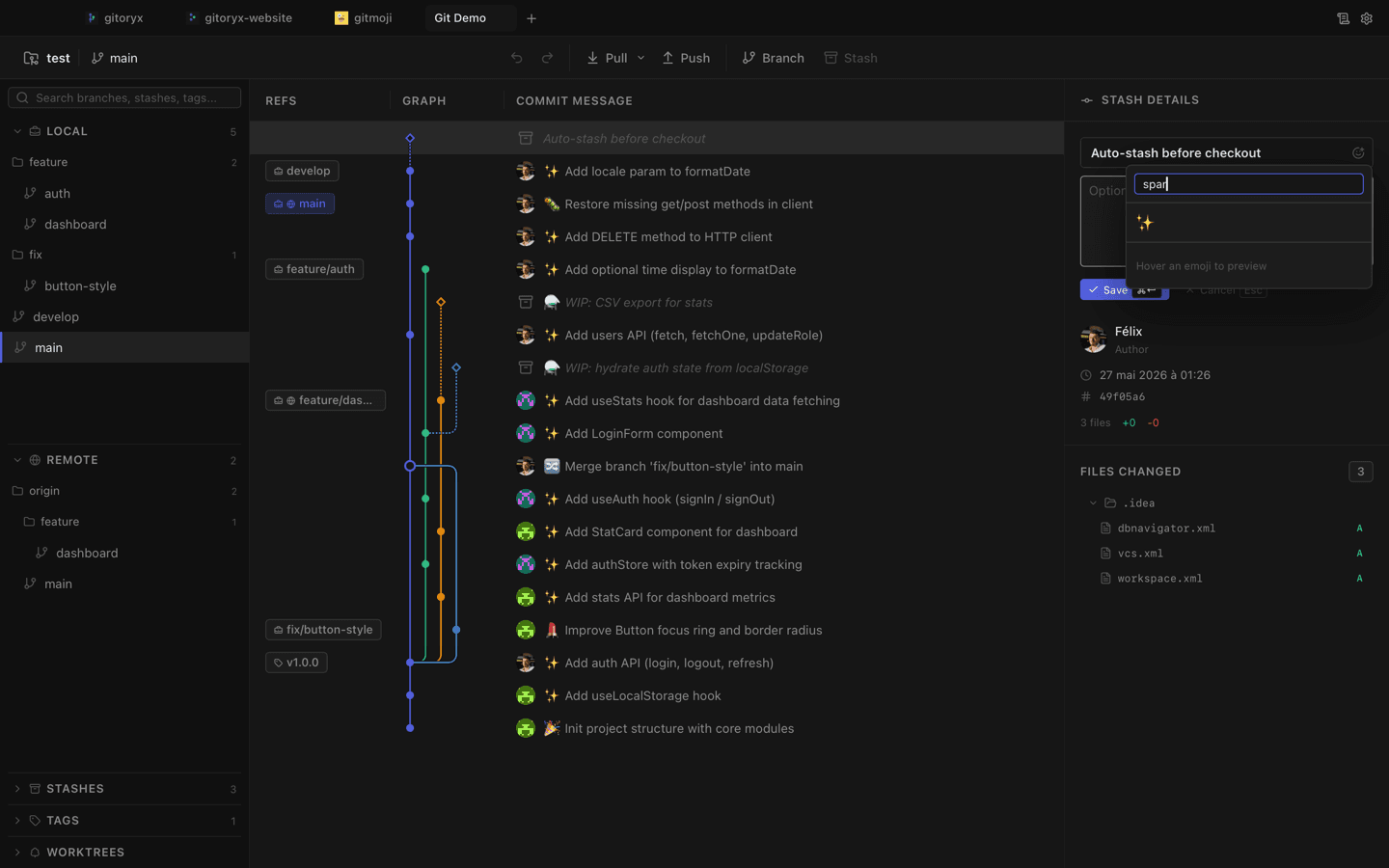
In Gitoryx: Built-in Gitmoji picker: browse and insert any emoji from the commit panel in one clickHow it works Step 5: Use Gitmoji for visual commit history
Gitmoji maps emojis to commit types. Every emoji has a specific meaning, making the log instantly scannable.
Terminal✨ feat: add dark mode toggle🐛 fix: correct off-by-one error in pagination♻️ refactor: extract auth logic to service layer📝 docs: update API reference🚀 ci: deploy to production on tag push⚡️ perf: cache user preferences in localStorage🔒 fix: sanitize user input to prevent XSS🎨 style: apply Prettier formatting🗑️ chore: remove unused imports✅ test: add integration tests for checkout flowTip: You don't have to pick between Conventional Commits and Gitmoji: many teams use both:
✨ feat(auth): add login formStep 6: Enforce conventions with a commit-msg hook
Use commitlint + Husky to automatically reject commits that don't follow the convention.
Terminal# Install commitlintnpm install --save-dev @commitlint/cli @commitlint/config-conventional# Create configecho "module.exports = { extends: ['@commitlint/config-conventional'] };" > commitlint.config.js# Add Husky hooknpx husky add .husky/commit-msg 'npx --no -- commitlint --edit "$1"'Step 7: Generate a changelog automatically
With Conventional Commits in place, tools like
standard-versionorrelease-pleasecan generate a full changelog and bump the version automatically.Terminal# Install standard-versionnpm install --save-dev standard-version# Add to package.json scripts:# "release": "standard-version"npm run release# → bumps version in package.json# → generates/updates CHANGELOG.md# → creates a git tag
Mistakes to avoid with commit conventions
- Inconsistent adoption
- Half the team uses conventions, half doesn't. The log becomes a mix of structured and unstructured messages.
- Fix: Enforce it automatically with commitlint. A hook that rejects non-conforming messages eliminates the inconsistency.
- Using `feat` for everything
- Some developers use
featfor bug fixes, refactors, and documentation changes because it feels more exciting. - Fix: The type must match the intent. Misusing types breaks automated changelog generation and makes the log misleading.
- Using emojis without a standard
- Random emojis picked on a whim add visual noise instead of useful signal.
- Fix: Adopt the official Gitmoji list (gitmoji.dev) so every emoji has a consistent, shared meaning.
Commit conventions in Gitoryx
Gitoryx displays commit types as colored badges in the commit graph, so you can immediately see which commits are features, fixes, or chores without reading each message.
- Built-in Gitmoji picker: browse and insert any emoji from the commit panel in one click
- Conventional Commits type selector directly in the commit message input
- Commit history shows Gitmoji emojis rendered inline next to messages
- Integrate commitlint via a pre-commit hook: Gitoryx surfaces hook errors inline
Free plan · no account required · macOS, Windows and Linux
Commit conventions: frequently asked questions
- What does chore mean in a git commit?
choreis a commit type for maintenance tasks that do not affect production code or the public API. Typical chores include updating dependencies (chore(deps): bump lodash), adjusting build tooling (chore(build): migrate to Vite), and repository housekeeping like updating.gitignore. If end users would never notice the change, it's achore.- What is chore in git?
- In Git commit conventions (Conventional Commits),
choreis the type label for internal housekeeping tasks: things like dependency upgrades, build system changes, and configuration updates that have no user-visible impact. It is one of the ten standard commit types alongsidefeat,fix,docs,style,refactor,test,ci,perf, andrevert. - What is the difference between chore and refactor in git commits?
- Use
chorefor tasks that keep the project healthy but don't change any code logic: like updating a dependency or cleaning up.gitignore. Userefactorwhen you restructure or rewrite internal code without changing its external behavior. A chore is housekeeping; a refactor is code-level restructuring. - What is feat in a git commit message?
featstands for 'feature'. It marks a commit that adds new functionality visible to users or API consumers. In semantic versioning, afeatcommit triggers a MINOR version bump (e.g., 1.2.0 → 1.3.0). Example:feat(auth): add Google OAuth login.- What is the Conventional Commits specification?
- Conventional Commits is a lightweight specification for commit message format:
<type>(<scope>): <description>. Common types arefeat,fix,chore,docs,refactor,test. It enables automated changelog generation and semantic versioning. - What are all the git commit message types?
- The standard Conventional Commits types are:
feat(new feature),fix(bug fix),chore(maintenance),docs(documentation),style(formatting),refactor(code restructure),test(tests),ci(CI/CD changes),perf(performance),revert(reverts a commit). Teams can also define custom types. - What is Gitmoji?
- Gitmoji is a convention that maps specific emojis to commit intents. For example: ✨ for new features, 🐛 for bug fixes, ♻️ for refactors. It makes the commit log visually scannable. See the full list at gitmoji.dev.
- Should I use Conventional Commits or Gitmoji?
- Both work well, and they can be combined:
✨ feat(auth): add login form. Conventional Commits is better for tooling (automated changelogs, semantic release). Gitmoji adds a visual layer on top. Pick one or both. Consistency matters more than which system you choose. - How do I enforce commit conventions in my team?
- Use commitlint with a Husky
commit-msghook. It automatically rejects commits that don't match the configured format and shows an error message explaining the correct format.
Related reading
- Git Commit: The Complete Beginner's GuideTutorial · 9 min
- Git Hooks: Automate Actions at Key Points in Your WorkflowTutorial · 11 min
- Git Changelog & Sprint Visualization: Track What ShipsTutorial · 13 min
- Gitmoji: The Practical Guide to Emoji Commit MessagesBlog · 14 min